Built for service businesses that live on invoices and billable time
Run invoicing, time tracking, service documents, expenses, and reports from one polished workspace.
MyInvoiceTime helps technicians, consultants, and service teams move from tracked hours to client-ready invoices,
work orders, estimate approvals, payment follow-up, fee disclosures, expense control, built-in help, and export-ready reporting without juggling disconnected tools.
MyInvoiceTime
DashboardClientsExpensesInvoicesProjectsReportsServices & ItemsTime TrackingWork Order / Est.
Invoice Editor
Document-first invoicing that is already aligned with print, PDF, and email.
PreviewSave PDFSend
INVOICE
Branding, reply-to, client display rules, and totals all stay synchronized.
Billed ToClient display preferences and addresses flow directly from the client record.
Issue DateDue DateInvoice #
Item / DescriptionRateQtyTaxAmount
Time Tracking
Track billable time fast, then convert it into invoice-ready labor with less re-entry.
Recent EntriesBy Client30/60/90 Days
Recent Entries
Hours by client stay visible, filterable, and ready for billing.
All ClientsPast 30 Days
Northwind Co.2.50 hrs
On-site diagnostics and client briefing
Brightline Medical1.75 hrs
Workstation reconfiguration and QA
West Harbor Dental3.00 hrs
Network troubleshooting and router replacement
Expenses
Handle one-off purchases and recurring obligations with reminders and category visibility.
This MonthRecurringCalendar
Expense Entries
Fiber Internet
Utilities
$124.00
OpenAI Codex
AI Tools & Subscriptions
$79.99
Replacement SSDs
Supplies & Materials
$264.88
Month View
Category-colored entries surface what is due and what already posted.
Reports
Switch time windows, basis, and exports without rebuilding the same report every month.
Cash BasisCustom RangeSave Preset
Revenue$28,440
Expenses$6,184
Net$22,256
Payments
Sent, partial, paid, and overdue stay visible.
Once invoices go out, payment records and status changes stay attached to the same document trail.
Hours By Client
Tracked and non-tracked hours both count.
Billable labor can come from time entries or invoice items built around hourly services.
Recurring Schedules
Amounts can change without breaking the cadence.
Edit generated recurring expense amounts on the fly while keeping the scheduled due pattern intact.
Exports
Print, PDF, CSV, and RTF are built into the reporting flow for maximum compatibility across devices and operating systems.
Get management-ready and tax-prep-friendly output without reformatting the results elsewhere.
Client Documents
Invoices stay light-paper clean, even when the app is in dark mode.
Reply-to logic and logo controls
Single and multi-page print tuning
Email delivery with attached PDF
Billing Workflow
Recent entries stay filterable by client and date range.
Fast review before invoicing
Clear date-window context
Built for service teams, not abstract timers
Reminders
Scheduled reminder emails can fire before a bill is due or auto-deducted.
7:00 AM send timing support
Reminder lead-time control
One-off and recurring coverage
Tax Visibility
Sched. C expense mapping is already in the reports workspace.
Saved presets and custom ranges
Cash or accrual basis toggle
Business snapshot without spreadsheet drift
Invoicing leads the workflowCreate paper-grade invoices that preview, print, save as PDF, send cleanly, and support payments, reminders, and added-charge disclosures.
Time tracking feeds the billing sideTurn tracked labor into faster invoicing and clearer client reporting.
Operations stay connectedExpenses, reports, payments, work orders, estimates, storage fees, and Help Guide support stay tied to the same business record.
The app’s center of gravity
Invoicing
Invoicing is one of your critical work surfaces, and the rest of the system is designed and connected to support it.
Build invoices on a document-like surface, keep branding and reply-to behavior under control, log payments,
track sent status, and print or save polished PDFs without wrestling with a separate export template.
Work Orders and Estimates can also be converted to Invoices with a single click, and Clients can be added
on the fly, in addition to being selected from a searchable dropdown of your existing list.
Additionally, you can turn any Invoice into a reusable billing template, and every invoice has options for
adding multiple reminder types, as well as late fees, interest, and storage fees, on an individual basis.
Inline invoice editing that stays close to final output
Real payment logging with status movement from sent to partial to paid
Email delivery, print, and saved PDF from the same source document
Invoice EditorPaper-grade output
My Company
Branding, reply-to, and client display rules stay synced.
INVOICE
Preview / Print / PDF / Send
Billed ToMy Favorite Client
123 Main Street Goodtown, CA 93210
Issue Date09/22/2026
Due Date09/29/2026
Invoice #26092201
Item / DescriptionQtyAmount
Computer Services
Swap out battery on HP laptop
0.5$54.00
3 HP replacement batteries
$39.95 each + tax
3$119.85
Travel / setup time
Imported from billable hours
1.0$108.00
Time TrackingBilling-ready labor capture
This MonthAll HoursClient Filter
Unbilled Time18.5 hrs
Recent Entries7 this week
My Favorite Client
Battery replacement and testing
2.5 hrs
Residential Support
On-site printer troubleshooting
1.0 hrs
Website Maintenance
Non-tracked hourly service item
3.0 hrs
My Favorite Client
Residential Support
Website Maintenance
Keep billable hours from slipping through the cracks
Time Tracking
Time tracking is treated like part of the billing workflow, not a separate island.
Track labor by client, review recent entries by time window, and keep tracked and non-tracked billable hours visible
so invoicing stays fast even when the work came in through different channels.
Plus, you can quickly create a Monthly Time Sheet automatically, from all of your time entries for a client,
without having to enter them all manually.
Client and date-range filtering for recent entries
Hours by client reporting that recognizes both tracked and non-tracked hourly work
Clearer path from labor capture to invoicing
Beyond billing alone
Work orders, expenses, and reports help the business stay organized around the work that actually happened.
MyInvoiceTime is designed for service businesses that need to document service, manage recurring obligations,
and export real business reporting, not just send a bill and hope the rest gets handled somewhere else.
01
Work orders & estimates
Capture equipment details, service descriptions, manual-entry contacts, signatures, and print-ready service paperwork.
02
Expense operations
Track one-off and recurring expenses, reminder timing, category views, and a calendar built for due awareness.
03
Reporting
Switch basis, save presets, export cleanly, and keep management and tax reporting closer to the source data.
04
Help & usability
Built-in help coverage and screen-level help links reduce support friction and keep users working inside the app.
Using MyInvoiceTime Tour
A guided walkthrough of how the app fits together in real use.
Step through the main operating path: dashboard awareness, document creation, follow-up controls,
delivery, and reporting.
Actual screenshots of the MyInvoiceTime app on a desktop browser.
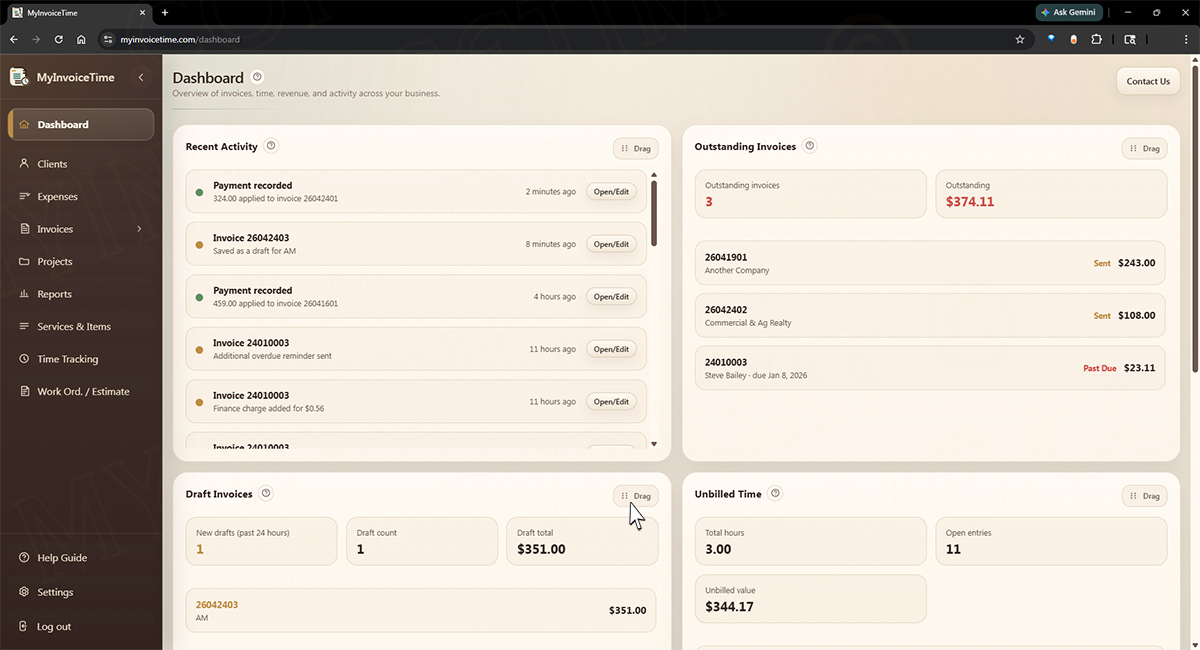
Step 1
Start from the Dashboard
See draft invoices, overdue balances, unbilled time, expense timing, revenue snapshots, and recent activity before deciding what needs attention.
Click or tap the image for an expanded view.
Step 2
Manage all of your clients
Keep customer contact details, billing addresses, document display choices, and reminder preferences organized in one searchable client list.
Click or tap the image for an expanded view.
Step 3
View & manage expenses
Create and edit one-time and recurring expenses, add reminders, assign categories, and use the visual expense calendar to see what is coming due.
Click or tap the image for an expanded view.
Step 4
Create the client-facing document
Build invoices, work orders, or estimates on a paper-like surface with line items, notes, client details, approvals, blank forms, and conversion from service document to invoice.
Click or tap the image for an expanded view.
Step 5
Add reminders and fee disclosures
Turn on the exact reminders, late fees, finance charges, or storage-fee language that belongs on that client agreement.
Click or tap the image for an expanded view.
Step 6
Preview, send, print, or save
Use the same saved document for preview, email delivery, browser print, saved PDF, payments, and reminder follow-up so client output stays consistent.
Use Projects to organize time tracking when a client needs separate billing, locations, phases, departments, or ongoing work streams.
Click or tap the image for an expanded view.
Step 8
View & generate multiple Reports
Keep the business organized with revenue, collections, unpaid invoices, time, expense detail, Schedule C expense breakdowns, watchlists, and export-ready reports. Sole proprietors and others can even generate a Personal Income & Expense Sheet.
Click or tap the image for an expanded view.
Step 9
Track your time efficiently
Create structured time entries, connect them to clients, projects, and services, review recent entries, and use monthly time sheets or reports before billing.
Click or tap the image for an expanded view.
Step 10
Comprehensive Help Guide
Use the detailed knowledge base to learn the app, follow screen-specific help links, troubleshoot common questions, and get more from MyInvoiceTime features.
Click or tap the image for an expanded view.
Step 11
Settings to manage your account
Manage Business, Profile, Security, Appearance, Billing & Payments, and Import / Export settings from one organized account area.
Click or tap the image for an expanded view.
Why teams trust it
MyInvoiceTime is built for businesses that want polished client output and cleaner internal follow-through.
“When invoicing is the center of the workflow, everything else needs to support it without causing re-entry or drift.”
“Service businesses need documents that look right to the client and data that stays useful to the business after the document is sent.”
Feature map
Everything important, grouped where a user would naturally look for it.
MyInvoiceTime now covers the full route from first service document to invoice, payment,
follow-up, reporting, and support.
Invoicing & documents
Paper-grade invoice editor with Preview, Print, Save PDF, and Send
Payments, partial payments, paid status, overdue tracking, and recent activity
Recurring invoice templates with draft or auto-send handling
Before-due, due-date, overdue, and repeating overdue reminders
Late fees, additional late fees, finance charges, and storage-fee disclosures
Automatic ready-for-pickup date fill-in when storage fees are enabled
Work orders & estimates
Work order and estimate document types with print-ready layouts
Manual entry for first-contact customers and walk-in work
Estimate approval requests with signed client review links
Convert to Invoice with client details, notes, line items, and fee disclosures carried forward
Blank work order and estimate forms for offline or field use
Time, clients & operations
Client records with document display controls and reminder preferences
Projects for organizing work by property, location, phase, or engagement
Services & Items catalog with unit, rate, taxable, and hourly defaults
Time entries with client/project/service structure and monthly time sheets
Expenses, recurring expense schedules, reminders, and calendar views
Reporting, help & control
Dashboard watch cards for drafts, overdue invoices, unbilled time, and recent activity
Reports with basis choices, custom ranges, saved presets, watchlists, and exports
Sched. C expense breakdown for tax-prep review
Credit Card Expenses tracker and Personal Income & Expense Sheet for sole proprietors and others.
Import / Export tools for CSV portability
Searchable Help Guide with screen-level help links and troubleshooting articles
Detailed Account Settings to manage your business and user profiles, account security, appearance, billing, and your data
FAQ
Common questions and answers about using MyInvoiceTime.
Is MyInvoiceTime mainly an invoicing system?
Yes. Invoicing is the primary surface. Time tracking, payments, work orders, expenses, and reports are designed to support that billing workflow instead of competing with it.
Can it handle service businesses that do both tracked and untracked labor?
Yes. Billable hours can come from Time Tracking or from hourly Services & Items used directly on invoices, and both can flow into the reporting side.
Will invoices and work orders print professionally?
Yes. The app uses dedicated preview, print, and PDF flows so client-facing documents stay light-paper clean and commercially presentable.
Can expenses handle recurring bills with changing amounts?
Yes. Recurring schedules preserve timing while still letting you adjust each generated amount when the bill changes month to month.
Does the app support tax-oriented reporting?
Yes. Reports include a Sched. C expense breakdown, basis toggles, custom ranges, saved presets, and multiple export formats.
Can users get help without leaving the page they are working on?
Yes. The Help Guide is searchable, cross-referenced, and linked from major app screens and cards so users can open the right instructions in a separate tab.
How can I get started using MyInvoiceTime?
us about setting up an account for a very low rate compared to other Invoicing & Tracking services.
Can MyInvoiceTime support a professional client experience from first document to final payment?
That is the goal. The app is built to keep the document quality, payment follow-up, and reporting fidelity aligned across the full client lifecycle.
Ready to talk through fit?
Request access to MyInvoiceTime and we can walk through how it would fit your business.
Secure workspace access
Log in to your account
Enter your email and password to continue into your MyInvoiceTime workspace.
Contact MyInvoiceTime
Request access or ask a question
Tell us a little about your business and what you want to do with the platform.